
Box Of Synths manualThe synth
Engine: filters
The filter card and page: two filters, their types, cutoff, resonance, drive, envelope and key, the routing between them, and the filter envelope.
A filter takes frequencies out of the sound. Most sounds use a low-pass filter: it lets the lows through and removes the highs, and turning the cutoff down makes the sound darker. Box Of Synths has two filters and an envelope that moves the first one. Click the FILTER card in the ENGINE block to open them.
The filter card
The card has three lines: the main filter's type, cutoff and resonance, then the envelope amount, key tracking and drive, then the state of the second filter. Three checks sit on the right of the card:
- FILTER switches the main filter. Unticked, the sound passes untouched, though the filter envelope still drives FM.
- ENV switches the filter envelope. Off means an amount of 0. Ticking it brings the amount back to half.
- FILTER 2 switches the second filter on. It runs before the first one.
Cutoff is where the filter starts to take sound away. Res adds a peak at the cutoff, which gives the sweep its voice.
The two strips
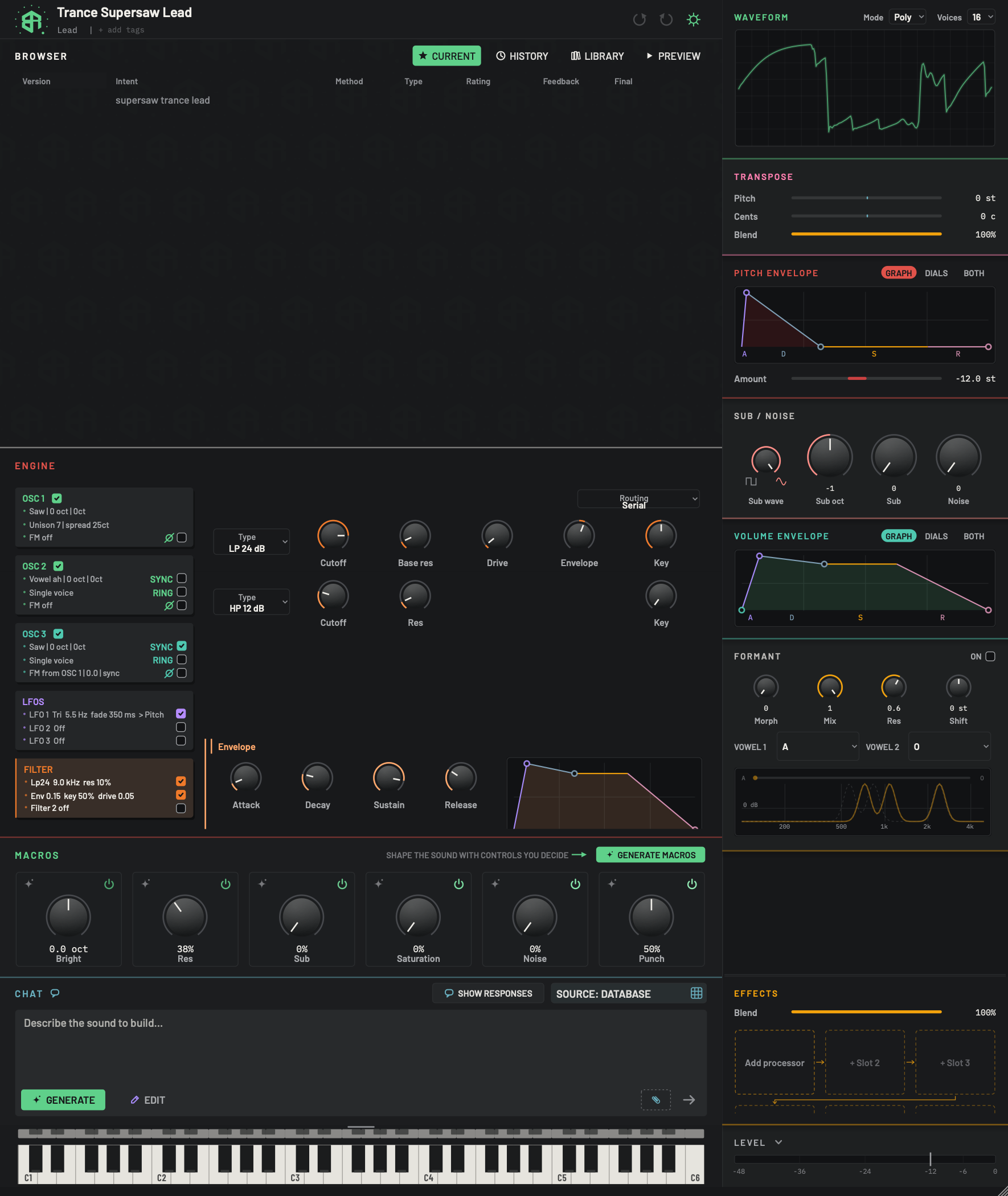
The FILTER card opens two filters and the envelope that moves the first one. The two strips share the same columns, so they read like a table.
-
1Filter cardChoice
Click to open the filter area on the right. It changes the view only. The lines sum up the filter.
- Options
Line 1: the type, cutoff and resonance, for example
Lp24 9.0 kHz res 10%.Line 2:
Env 0.15 key 50% drive 0.05(drive appears when it is above zero).Line 3:
Filter 2 off, orFilter 2with its type and cutoff.
Hover tip: Open the filter, its envelope and the second filter.
-
2Filter checksSwitch
Three checks down the right of the card.
FILTER: the main filter. Unticked, the sound passes untouched, although its envelope still drives FM.
ENV: the filter envelope. Off is an amount of 0. Ticking it brings the amount back to half.
FILTER 2: the second filter, which runs before the first.
- Starts as
- FILTER on, ENV on in this sound, FILTER 2 off
-
3RoutingChoice
How the two filters are joined.
- Options
Serial: filter 2 runs first and its output goes into filter 1.
Parallel: both filters hear the same signal and their outputs are added, half each.
- Starts as
- Serial
-
4Filter typeMenu
Click to open a list of the filter types, with the current one ticked. Click one to choose it.
- Options
Low-pass 24 dB, Low-pass 12 dB, High-pass 12 dB, Band-pass 12 dB. Low-pass lets low notes through and takes away highs. High-pass does the reverse. Band-pass keeps a band around the cutoff. The 24 dB version is steeper.
- Starts as
- Low-pass 24 dB
Hover tip: Choose how the filter removes frequencies.
-
5CutoffDial
The frequency where the filter starts working. Turn it down to darken a low-pass sound. The travel is strongly curved, so the low end is easy to set. The dial reads in Hz.
- Options
30 to 18000 Hz
- Starts as
- 4000 Hz
Hover tip: Sets the frequency where the filter starts working.
-
6Base resDial
Resonance: a peak at the cutoff that whistles as it rises. It is called base because macros add to it. Hover for the figure you actually hear.
- Options
0 to 0.98
- Starts as
- 0.1
Hover tip: Base resonance before macros. After macros: . Resonance macros add to this value. The value is shown to two decimals.
-
7DriveDial
Pushes the sound into the filter harder, which thickens and roughens it.
- Options
0 to 1
- Starts as
- 0
-
8EnvelopeDial
How far the filter envelope (below) moves the cutoff. Positive opens the filter as the note starts. Negative closes it, so the arc grows from the middle.
- Options
-1 to 1
- Starts as
- 0
-
9KeyDial
How much the cutoff follows the note you play. At 1 the filter moves up with the pitch, so high notes keep their brightness.
- Options
0 to 1
- Starts as
- 0.5
-
10Filter 2 typeMenu
The type of the second filter, chosen the same way as the first.
- Options
High-pass 12 dB, Low-pass 12 dB, Band-pass 12 dB, Notch, Comb. A notch cuts a narrow band. A comb gives a hollow, metallic ring.
- Starts as
- High-pass 12 dB
-
11Filter 2 cutoffDial
Cutoff of the second filter. Same behaviour as the first.
- Options
30 to 18000 Hz
- Starts as
- 200 Hz
-
12Filter 2 resDial
Resonance of the second filter.
- Options
0 to 0.98
- Starts as
- 0.1
-
13Filter 2 keyDial
How much the second filter's cutoff follows the note.
- Options
0 to 1
- Starts as
- 0
The Drive and Envelope columns are empty for filter 2: the filter envelope moves only the first filter.
-
14Envelope headingDisplay
Marks the filter envelope, the shape that moves the cutoff over the life of a note.
-
15AttackDial
How long the envelope takes to rise after a key goes down.
- Options
0.5 to 8000 ms
- Starts as
- 5 ms
-
16DecayDial
How long it takes to fall from the peak to the sustain level.
- Options
5 to 12000 ms
- Starts as
- 200 ms
-
17SustainDial
The level the envelope holds at while the key stays down.
- Options
0 to 1
- Starts as
- 0.8
-
18ReleaseDial
How long it takes to fall away after the key goes up.
- Options
5 to 12000 ms
- Starts as
- 300 ms
-
19Envelope graphArea
The envelope drawn as a shape. The corners are handles: drag them to edit the same four values as the dials. Time is drawn on a curve, so short times have room to show. One drag is one undo step.
The main filter is the top strip and the second filter is the strip under it. They share the same columns.
| Column | Filter 1 | Filter 2 |
|---|---|---|
| Type | Low-pass 24 dB, Low-pass 12 dB, High-pass 12 dB, Band-pass 12 dB. Default Low-pass 24 dB | High-pass 12 dB, Low-pass 12 dB, Band-pass 12 dB, Notch, Comb. Default High-pass 12 dB |
| Cutoff | 30 to 18000 Hz, default 4000 Hz | 30 to 18000 Hz, default 200 Hz |
| Base res (Res on filter 2) | 0 to 0.98, default 0.1 | 0 to 0.98, default 0.1 |
| Drive | 0 to 1, default 0 | none |
| Envelope | -1 to 1, default 0 | none |
| Key | 0 to 1, default 0.5 | 0 to 1, default 0 |
- Type is a menu: click it, pick a name from the list. A 24 dB filter is steeper than a 12 dB one. Notch removes a narrow band, and Comb gives a hollow, metallic ring.
- Cutoff is where the filter starts working. The dial reads in Hz. The line on the filter card switches to kHz from 1000 Hz.
- Base res is the resonance, a whistling peak at the cutoff. It is called base because macros add to it.
- Drive pushes the sound into the filter harder.
- Envelope is how far the filter envelope moves the cutoff. A negative amount closes the filter as a note starts.
- Key is how much the cutoff follows the note you play.
Routing
Routing, at the top right of the page, joins the two filters. Serial sends the sound through filter 2 and then filter 1. Parallel feeds both the same sound and adds their outputs, half each. The default is Serial.
The filter envelope
At the foot of the page the Envelope heading sits over four dials and a drawing. The envelope is a shape that plays out every time you press a key, and Envelope in the first strip decides how much of that shape reaches the cutoff.
| Dial | What it sets | Range | Default |
|---|---|---|---|
| Attack | Time to rise after the key goes down | 0.5 to 8000 ms | 5 ms |
| Decay | Time to fall from the peak to the sustain level | 5 to 12000 ms | 200 ms |
| Sustain | Level held while the key stays down | 0 to 1 | 0.8 |
| Release | Time to fall away after the key goes up | 5 to 12000 ms | 300 ms |
The graph beside the dials draws the same shape. Its corners are handles: drag them to change the same four values. The time axis is curved, so short times have room to show. The envelope can also drive FM, using FM env on the oscillator page (see Engine: oscillators).
-
1Open the filter
Click the FILTER card. The two strips and the envelope open on the right.
-
2Choose a type
Click Type and pick a name from the list, for example Low-pass 12 dB.
-
3Set the cutoff
Drag Cutoff down to darken the sound, and up to brighten it.
-
4Let a note move the filter
Raise Envelope. The filter now opens as each note starts, following the shape below.
-
5Shape the envelope
Drag the corners of the graph. The Attack, Decay, Sustain and Release dials move with them.
Dials follow the rules on How dials, sliders and keys behave.