
Box Of Synths manualSettings
Settings: Advanced
Agent limits, own-key prices and caps, the random word, dream bubbles, diagnostics and the settings file.
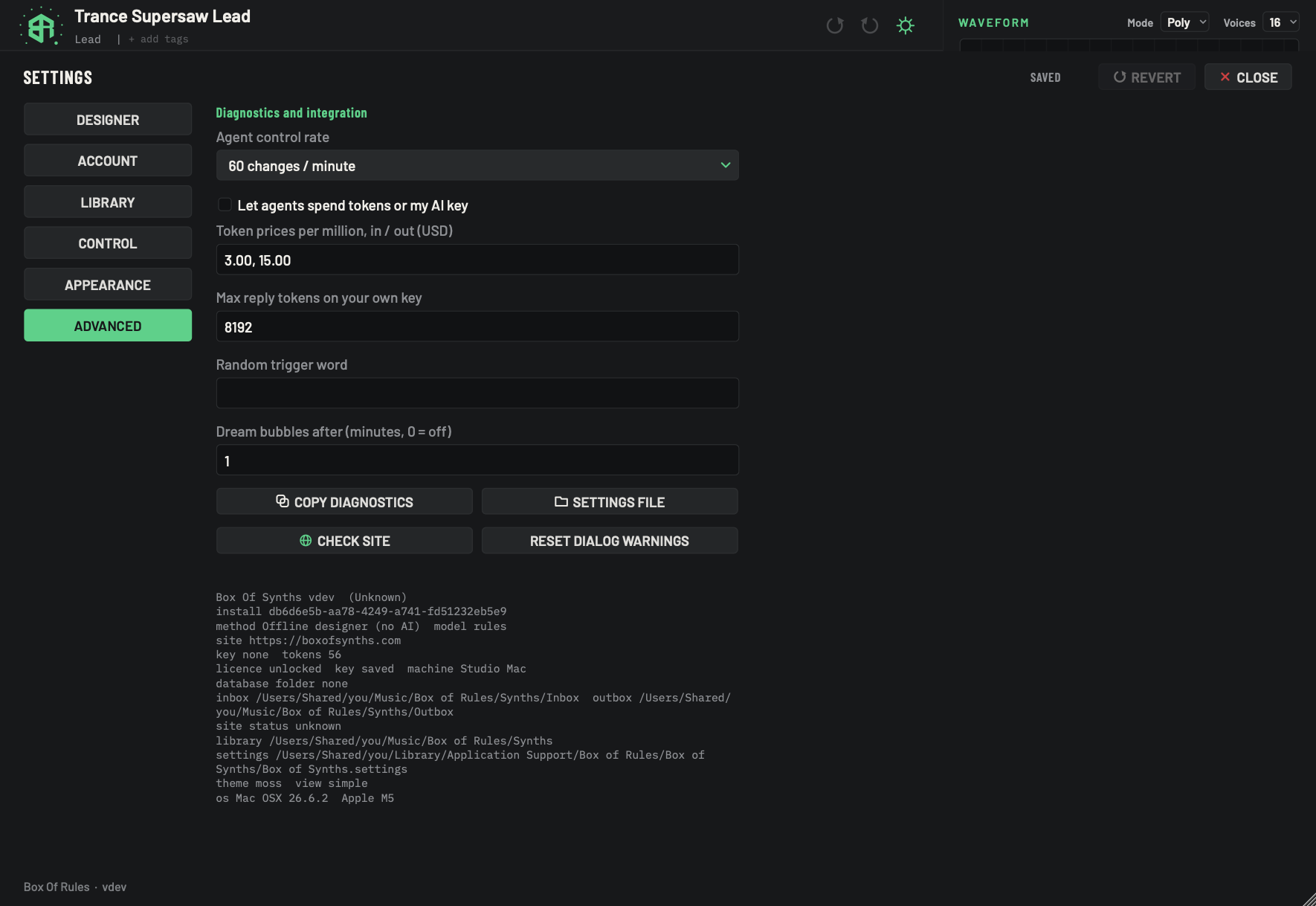
The Advanced tab holds the settings most people never need: how agents may work with the app, a few numbers for your own AI key, two small conveniences, and the tools you use when you ask support for help.
-
1Agent control rateMenu
How many control changes an agent may make to the synth each minute. Extra changes wait in a queue and are applied as the rate allows.
- Options
30 changes / minute
60 changes / minute
120 changes / minute
240 changes / minute
A value of 10 changes / minute or Unlimited shows in the list only if that value was already stored in your settings file.
- Starts as
- 60 changes / minute
-
2Let agents spend tokens or my AI keySwitch
Off: a design an agent asks for is made from the database and costs nothing. On: it uses the source you chose, which can spend tokens or bill your own AI key while you are away.
- Starts as
- Off
With it off, an agent request that arrives while you are not at the screen is answered from the database, and your chosen source is put back straight after.
-
3Token prices per millionText box
What your AI service charges per million tokens, in dollars: the input price, then the output price. The usage estimate uses it when the app does not already know the model's price. Separate the two numbers with a comma, a slash or a space.
- Options
Two numbers, for example
3, 15.- Starts as
- 3.00, 15.00
It needs both numbers. With only one, nothing is saved.
-
4Max reply tokens on your own keyText box
The most tokens one design reply may run to when you use your own key. A bigger window is your call and your bill.
- Options
Digits only, 1024 to 128000. A value outside the range is moved to the nearest end.
- Starts as
- 8192
-
5Random trigger wordText box
A word of your own that randomises the sound when it is all you type. The words random, variation and re-roll, and their translations, always do it.
- Options
Up to 24 characters.
- Starts as
- Empty
-
6Dream bubbles afterText box
On the start screen for a new sound, after this many idle minutes, your earlier requests drift by as dream bubbles. Enter 0 to turn them off.
- Options
0 to 60 minutes.
- Starts as
- 1
-
7Copy diagnosticsKey
Copies the text block at the bottom of this page to your clipboard, ready to paste into a support message. The line under the keys then says Copied.
-
8Settings fileKey
Shows the settings file in Finder or File Explorer.
-
9Check siteKey
Asks our site right now whether it is up. The result appears in the site status line in the Account tab.
-
10Reset dialog warningsKey
Brings back the two warnings you have switched off with Do not ask again. The line under the keys then says Dialog warnings restored. See Agreements and confirmations.
-
11Version lineDisplay
The Box Of Synths version, and whether you are running the standalone app or inside a host. Inside a host, the host's name shows here.
-
12Install lineDisplay
A code that identifies this install of Box Of Synths. Support may ask for it.
-
13Method lineDisplay
The source in use right now, and the model name it uses. With the built-in database it reads the offline designer and
rules. -
14Site lineDisplay
The site address the app talks to.
-
15Key and tokens lineDisplay
Whether an account key is saved on this computer (
savedornone), and how many tokens the account had at the last check. -
16Machine lineDisplay
The state of this machine, whether a machine key is saved, and the machine name.
-
17Database folder lineDisplay
The folder you chose for the offline database. It reads
nonewhile the database folder is still the default. -
18Inbox and outbox linesDisplay
The two folders an agent uses: the inbox, where its requests arrive, and the outbox, where answers go. Both sit inside your library folder.
The picture shows personal folder paths. Yours will show yours.
-
19Site status lineDisplay
Whether the site is up:
up,DOWNorunknown. It readsunknownuntil a site check has run. -
20Library lineDisplay
The path of your library folder.
-
21Settings lineDisplay
The path of the settings file.
-
22Theme lineDisplay
The id of the theme in use, followed by a view word you can ignore.
-
23System lineDisplay
Your operating system and processor.
Agents
Agent control rate is how many control changes an agent may make to the synth each minute. Extra changes wait in a queue and are applied as the rate allows. It starts at 60.
| Value | Notes |
|---|---|
| 30 changes / minute | |
| 60 changes / minute | The default. |
| 120 changes / minute | |
| 240 changes / minute | |
| 10 changes / minute | Shown only if that value was already stored in your settings file. |
| Unlimited | Shown only if that value was already stored in your settings file. |
Let agents spend tokens or my AI key is off to start with. Off, a design an agent asks for is made from the database and costs nothing. On, it uses the source you chose, which can spend tokens or bill your own AI key while you are away.
With it off, an agent request that arrives while nobody is at the screen is answered from the database, and your chosen source is put back straight after. See Settings: Designer, source by source for the Agent key.
Your own AI key
- Token prices per million, in / out (USD) holds what your AI service charges per million tokens, in dollars: the input price, then the output price. The usage estimate uses it when the app does not already know the price of the model. Separate the two numbers with a comma, a slash or a space, like
3, 15. It needs both numbers: with only one, nothing is saved. It starts at 3.00, 15.00. - Max reply tokens on your own key is the most tokens one design reply may run to. Use digits only, from 1024 to 128000. A value outside the range is moved to the nearest end. It starts at 8192. A bigger window is your call and your bill.
Two small conveniences
- Random trigger word is a word of your own that randomises the sound when it is all you type. It can be up to 24 characters. The words random, variation and re-roll, and their translations, always do it. It starts empty.
- Dream bubbles after (minutes, 0 = off) sets how long the start screen for a new sound sits idle before your earlier requests drift by as dream bubbles. Use 0 to 60. It starts at 1. Enter 0 to turn the bubbles off.
Diagnostics
Four keys sit under the fields.
- Copy diagnostics copies the text block at the bottom of the page to your clipboard, ready to paste into a support message. The line under the keys then says Copied.
- Settings file shows the settings file in Finder or File Explorer. On a Mac it is called
Box of Synths.settingsand sits inApplication Support, in the Box of Rules and Box of Synths folders. - Check site asks our site right now whether it is up. The result shows in the site status line in Settings: Account and privacy.
- Reset dialog warnings brings back the warnings you switched off. See below.
Send diagnostics to support, step by step
-
1Check the site
Click Check site. The Account tab then shows whether the site is up.
-
2Copy the block
Click Copy diagnostics. The line under the keys says Copied.
-
3Paste it
Paste into your support message. It holds the lines shown in the block at the bottom of this page, and never your key.
-
4Find the settings file
If support asks for the settings file, click Settings file to show it.
The diagnostics block
The block holds up to 18 lines of grey text. It never includes your key. The lines are:
| Line starts with | It tells you |
|---|---|
Box Of Synths v |
The version, and whether you are running the standalone app or inside a host. In a host, its name shows in brackets. |
install |
A code that identifies this install. Support may ask for it. |
method |
The source in use right now, and the model name it uses. With the built-in database it reads the offline designer and rules. |
site |
The site address the app talks to. |
key |
Whether an account key is saved on this computer (saved or none), then tokens and how many your account had at the last check. |
licence |
The state of this machine, whether a machine key is saved, and the machine name. |
database folder |
The folder you chose for the offline database, or none while it is still the default. |
inbox, outbox |
The two folders an agent uses. Both sit inside your library folder. |
site status |
up, DOWN or unknown. It reads unknown until a site check has run. |
library |
The path of your library folder. |
settings |
The path of the settings file. |
theme |
The id of the theme in use, then a view word you can ignore. |
os |
Your operating system and processor. |
The paths are your own. The picture shows the paths of the computer it was taken on.
Reset dialog warnings
Some confirmation cards carry a Do not ask again tick. Reset dialog warnings brings back the two you have switched off, Switch synth? and Leave this new synth? The line under the keys then says Dialog warnings restored. Other remembered ticks are not touched. See Agreements and confirmations.