
Box Of Synths manualThe synth
Engine: oscillators
The oscillator cards and dials in the ENGINE block: wave, morph, pitch, level, unison, FM, sync, ring, phase and the harmonics area.
The oscillators are where the sound starts. A sound can use one, two or three of them. The ENGINE block shows a card for each one down the left, and the dials for the open card on the right. Click a card to open it. Clicking only changes what you see, never the sound.
The oscillator cards
Each card sums up its oscillator in three lines, and holds a few small switches.
- The check beside the name switches the oscillator on. OSC 1 is always on. Ticking OSC 2 or OSC 3 gives the sound a second or third oscillator.
- SYNC and RING sit on the OSC 2 and OSC 3 cards. SYNC restarts the oscillator each time OSC 1 restarts. RING multiplies it by OSC 1.
- The phase flip glyph at the foot of each card turns the oscillator's wave upside down. Right-click it and choose Optimise the phases to let the synth pick the flips that add up best.
- A card whose oscillator is off is drawn paler, but you can still open it to see its settings.
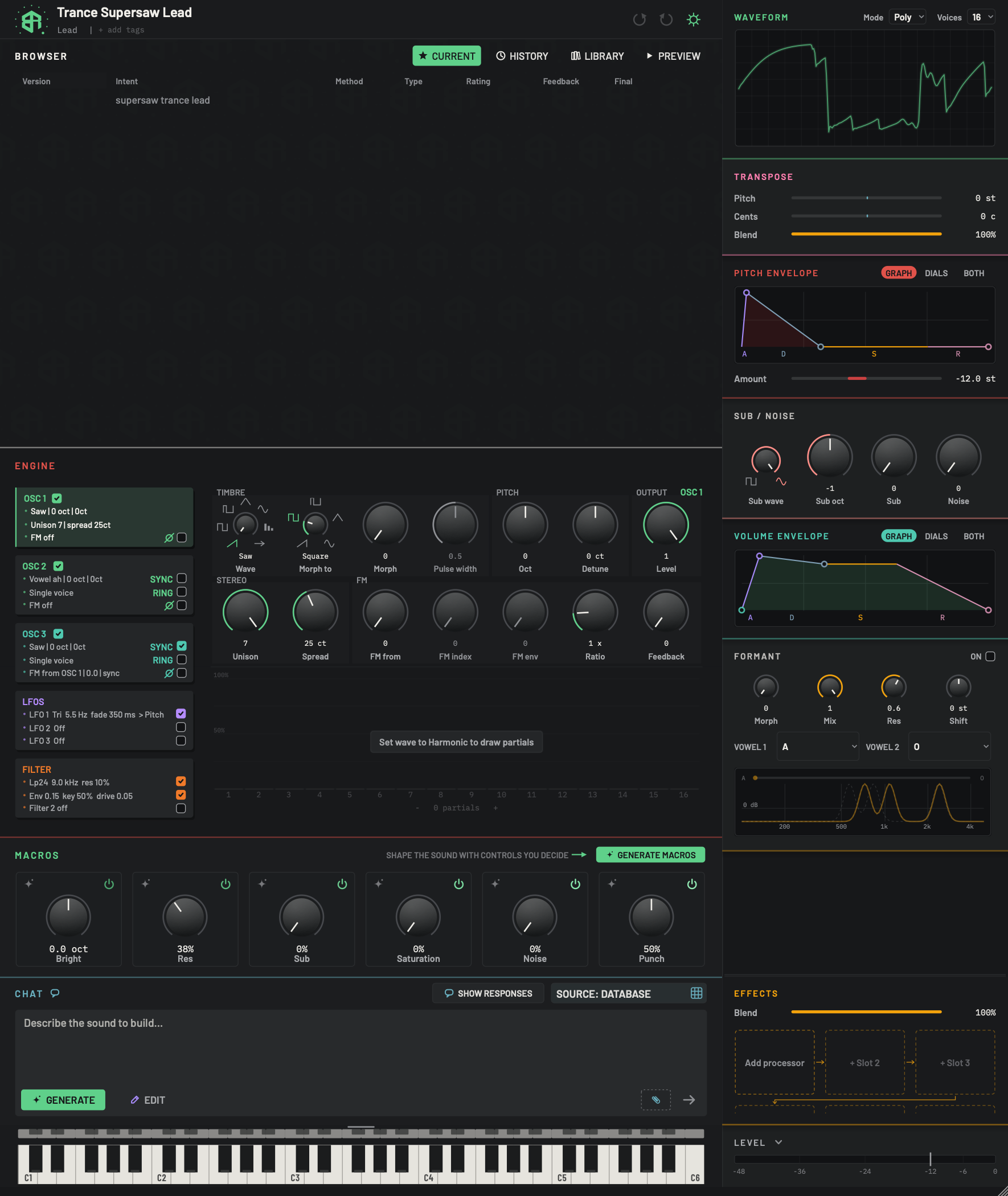
The ENGINE block sits in the middle of the window. The cards down the left pick what the area on the right shows. Here OSC 1 is open. The cards for the LFOs and the filter are described on Engine: LFOs and modulation and Engine: filters. Every dial follows the rules on How dials, sliders and keys behave.
-
1Engine titleLink
The name of the block. Click it to fold the ENGINE block away, and click again to open it. Whether it is folded is remembered.
-
2OSC 1 cardChoice
Click to open OSC 1 in the area on the right. The open card has a coloured bar at its left edge. The card only changes what you see, never the sound. Its three lines sum up the oscillator.
- Options
Line 1: the wave, the octave and the detune, for example
Saw | 0 oct | 0ct. It starts withSilentwhen the level is 0.Line 2:
Unison 7 | spread 25ct, orSingle voice.Line 3:
FM off, orFM from OSC 1 | 0.0with| syncor| ringadded.
Hover tip: Open this oscillator's dials.
-
3OSC 1 checkSwitch
Shows that the oscillator is on. OSC 1 is always on, so this check is ticked and cannot be changed.
Hover tip: The first oscillator is always on.
-
4Phase flipSwitch
The small glyph and check at the foot of every oscillator card. Tick it to flip the oscillator's phase, which turns its wave upside down. Right-click it and choose Optimise the phases to let the synth pick the flips that make the oscillators add up loudest over one cycle.
- Starts as
- Off
Hover tip: Flip this oscillator's phase. Right-click: let the synth pick the phases that add up best.
-
5OSC 2 cardChoice
Opens OSC 2. Same lines as OSC 1. Its tick turns the second oscillator on and off. It also holds the SYNC and RING checks and the phase flip. See Engine: oscillators, OSC 2 open.
Tick tip: Turn on a second oscillator.
-
6Sync and RingSwitch
Two checks on the OSC 2 and OSC 3 cards. OSC 1 has neither.
SYNC: hard sync. This oscillator restarts its cycle every time OSC 1 restarts, which gives the tearing, sweeping tone of a synced lead.
RING: ring modulation. This oscillator is multiplied by OSC 1, which gives clangy, bell-like sounds.
The card line shows
| syncor| ringwhen one is on.- Starts as
- Both off
Hover tips: Hard sync: this oscillator restarts its cycle with OSC 1. and Ring modulation: this oscillator multiplied by OSC 1.
-
7OSC 3 cardChoice
Opens OSC 3. Same as OSC 2, including SYNC (ticked in this picture) and RING. Its tick turns the third oscillator on and off. On a granular sound this card is replaced by the GRANULAR card, see Granular card.
Tick tip: Turn on a third oscillator.
-
8LFOS cardChoice
Opens the three LFOs. Covered on Engine: LFOs and modulation.
-
9Filter cardChoice
Opens the filter, its envelope and the second filter. Covered on Engine: filters.
-
10Open oscillator nameDisplay
Names the oscillator whose dials are open, in that oscillator's colour: OSC 1 green, OSC 2 the brand colour, OSC 3 aqua.
-
11WaveDial
Chooses the oscillator's wave. The marks around the dial are the six classic waves: saw, square, pulse, triangle, sine and harmonic. A seventh mark, an arrow, means there are more waves in the right-click menu. Drag to step from one wave to the next. Right-click to see every wave, with the current one ticked. See The wave menu.
When you pick a wave from the bank, the pointer rests on the arrow and the wave's name appears under the dial.
- Options
66 waves: Saw, Square, Pulse, Tri, Sine, Harmonic, then 60 bank waves.
- Starts as
- Saw
Hover tip: Choose the oscillator waveform.
-
12Morph toDial
The wave that Morph blends toward. Marks: saw, square, pulse, triangle, sine. The harmonic wave is not on offer.
- Options
Saw, Square, Pulse, Tri, Sine
- Starts as
- Square
-
13MorphDial
Blends from Wave (all the way left) toward Morph to (all the way right). The harmonic wave does not morph.
- Options
0 to 1
- Starts as
- 0
An LFO pointed at Morph is clamped at 0, so only the upper half of its swing is heard.
-
14Pulse widthDial
How wide the high part of the pulse wave is. It does nothing on any other wave, and greys out.
- Options
0.05 to 0.95
- Starts as
- 0.5
Hover tip: Sets the pulse waveform's duty cycle. It has no effect on other waves. Greyed tip: Only the pulse wave has a width.
-
15OctDial
Moves the oscillator up or down in whole octaves. It steps, one octave per notch.
- Options
-3 to +3 octaves
- Starts as
- 0
-
16DetuneDial
Fine tuning of the whole oscillator, in cents. A hundred cents is one semitone. Set oscillators a few cents apart for a slow beating.
- Options
-50 to +50 ct
- Starts as
- 0 ct
-
17LevelDial
How loud this oscillator is in the mix. At 0 it is silent, and every dial on the card greys out except Wave and Level, unless this oscillator is feeding another one by FM.
- Options
0 to 1
- Starts as
- 1
Greyed tip on the other dials: Silent: the level is at zero.
-
18UnisonDial
How many detuned copies of this oscillator play at once. More copies make a thicker, wider sound. It steps one copy at a time. The harmonic wave always plays one voice, so the dial greys out.
- Options
1 to 7
- Starts as
- 1
Greyed tip: The harmonic wave has one voice.
-
19SpreadDial
How far apart the unison copies are tuned, in cents. It does nothing while Unison is 1.
- Options
0 to 60 ct
- Starts as
- 10 ct
-
20FM fromDial
Chooses which oscillator bends this one's phase, which is FM. It reads OFF, or the number (1, 2 or 3) of the oscillator that does the bending. It steps one notch at a time.
- Options
OFF, 1, 2, 3
- Starts as
- OFF
Hover tip: Choose the oscillator that phase-modulates this one. NONE disables FM.
-
21FM indexDial
How strongly the chosen oscillator bends this one. Higher is brighter and harsher. The dial has a curved travel, so small values are easy to set.
- Options
0 to 12
- Starts as
- 0
Greyed until FM from has a source: Off until FM FROM picks a source.
-
22FM envDial
How much the filter envelope changes the FM index over the life of a note. Set the shape of that envelope on Engine: filters.
- Options
0 to 1
- Starts as
- 0
Hover tip: Sets how strongly the filter envelope changes FM depth.
-
23RatioDial
Multiplies the oscillator's pitch, read as for example
1 x. In FM work it sets the pitch of the modulator against the carrier. Whole numbers sound tuned, odd fractions sound bell-like.- Options
0.01 to 32 x
- Starts as
- 1 x
-
24FeedbackDial
Feeds the oscillator back into its own phase. Low settings add edge, high settings add rasp and noise.
- Options
0 to 1
- Starts as
- 0
-
25Harmonics areaArea
Sixteen bars, one for each partial of the harmonic wave, numbered 1 to 16 along the foot. It is always under the open oscillator. When the wave is Harmonic, press and drag across the bars to draw: the height of a bar is how loud that partial is, and every bar your hand crosses is filled in. Hover a bar for Partial n: value. One drag is one undo step. With any other wave the area is greyed.
- Options
Each partial 0 to 1. Grid lines at 25, 50, 75 and 100 percent.
-
26Set wave to HarmonicKey
Shown while the wave is not Harmonic. Click it and a card asks Draw the partials? Choose Set to Harmonic to set the oscillator's wave to Harmonic so you can draw partials. The card has a Do not ask again switch.
It reads Set wave to Harmonic to draw partials.
-
27Partials countKey
Reads
- n partials +. Click the left half to remove one partial and the right half to add one.- Options
1 to 16 partials
The oscillator page
The dials are grouped in small labelled boxes. The top row holds TIMBRE (Wave, Morph to, Morph, Pulse width), PITCH (Oct, Detune) and OUTPUT (Level). The row under it holds STEREO (Unison, Spread) and FM (FM from, FM index, FM env, Ratio, Feedback). The name of the open oscillator is at the top right.
Every dial stays where it is. A dial that has no effect right now is greyed, and its hover tip says why. A muted oscillator greys everything except Wave and Level, unless another oscillator is using it for FM. Values appear under a dial when you point at it. Full rules are on How dials, sliders and keys behave.
| Dial | Range | Default |
|---|---|---|
| Wave | 66 waves | Saw |
| Morph to | Saw, Square, Pulse, Tri, Sine | Square |
| Morph | 0 to 1 | 0 |
| Pulse width | 0.05 to 0.95 | 0.5 |
| Oct | -3 to +3 | 0 |
| Detune | -50 to +50 ct | 0 ct |
| Level | 0 to 1 | 1 |
| Unison | 1 to 7 | 1 |
| Spread | 0 to 60 ct | 10 ct |
| FM from | OFF, 1, 2, 3 | OFF |
| FM index | 0 to 12 | 0 |
| FM env | 0 to 1 | 0 |
| Ratio | 0.01 to 32 x | 1 x |
| Feedback | 0 to 1 | 0 |
The wave menu
Right-click Wave to open a menu of every wave, with the current one ticked. It starts with the six classic waves under Classic: Saw, Square, Pulse, Tri, Sine and Harmonic. Under them come 60 more, in families.
| Family | Waves |
|---|---|
| Basic | Soft saw, Bright saw, Saw stack, Soft square, Pulse 25, Pulse 12, Double pulse, Skew triangle, Bright triangle, Notched saw, Stairs 8, Stairs 4 |
| Sync | Sync 2, Sync 3, Sync 4, Sync saw, Sync sweep |
| Fold | Folded sine, Deep fold, Clipped sine, Half sine, Rectified sine, Crushed saw, Crushed sine, Spike |
| Organ | Drawbar 16 8, Full drawbar, Jazz drawbar, Pipe, Reed, Odd stack, Even stack, Comb 5 |
| Vocal | Vowel ah, Vowel eh, Vowel ee, Vowel oh, Vowel oo, Nasal |
| String | Pluck, Bass string, Tine, Clav, Muted string |
| Metal | Bell, Glass, Metal, FM 2, FM 3, Bright FM |
| Digital | Buzz, Grit, Rough, Noise cycle, Digit |
| Chord | Octaves, Fifths, Power chord, Major, Minor |
When a bank wave is chosen, the Wave dial rests its pointer on the arrow mark and shows the wave's name.
Morph
Morph blends the oscillator from its Wave toward the wave in Morph to. At 0 you hear only Wave. At 1 you hear only Morph to. The harmonic wave does not morph.
FM
FM means one oscillator bends the phase of another. To use it, open the oscillator you want to bend, set FM from to the oscillator that does the bending, then raise FM index. FM env lets the filter envelope change the depth over the life of a note (see Engine: filters). Ratio sets the pitch of the oscillator against the others, and Feedback feeds it back into itself. When a macro owns the FM depth, FM index turns that macro instead, and its hover tip reads Turns the FM macro, which owns this depth. The card line shows FM from OSC 1 | 0.0 when it is on, and FM off when not.
Morph blends the wave towards the Morph to wave. Pulse width changes how wide the high part of a pulse wave is, and does nothing on other waves.
Draw your own wave
Under the dials is the harmonics area. Set the wave to Harmonic to draw: press and drag across the sixteen bars. Each bar is one partial of the sound, and its height is how loud it is. The strip under the bars, - n partials +, adds or removes a partial when you click its right or left half. If the wave is not Harmonic, the area is greyed and a key says Set wave to Harmonic to draw partials. Click that key and a card asks Draw the partials? Choose Set to Harmonic and the wave switches to Harmonic. The card has a Do not ask again switch.
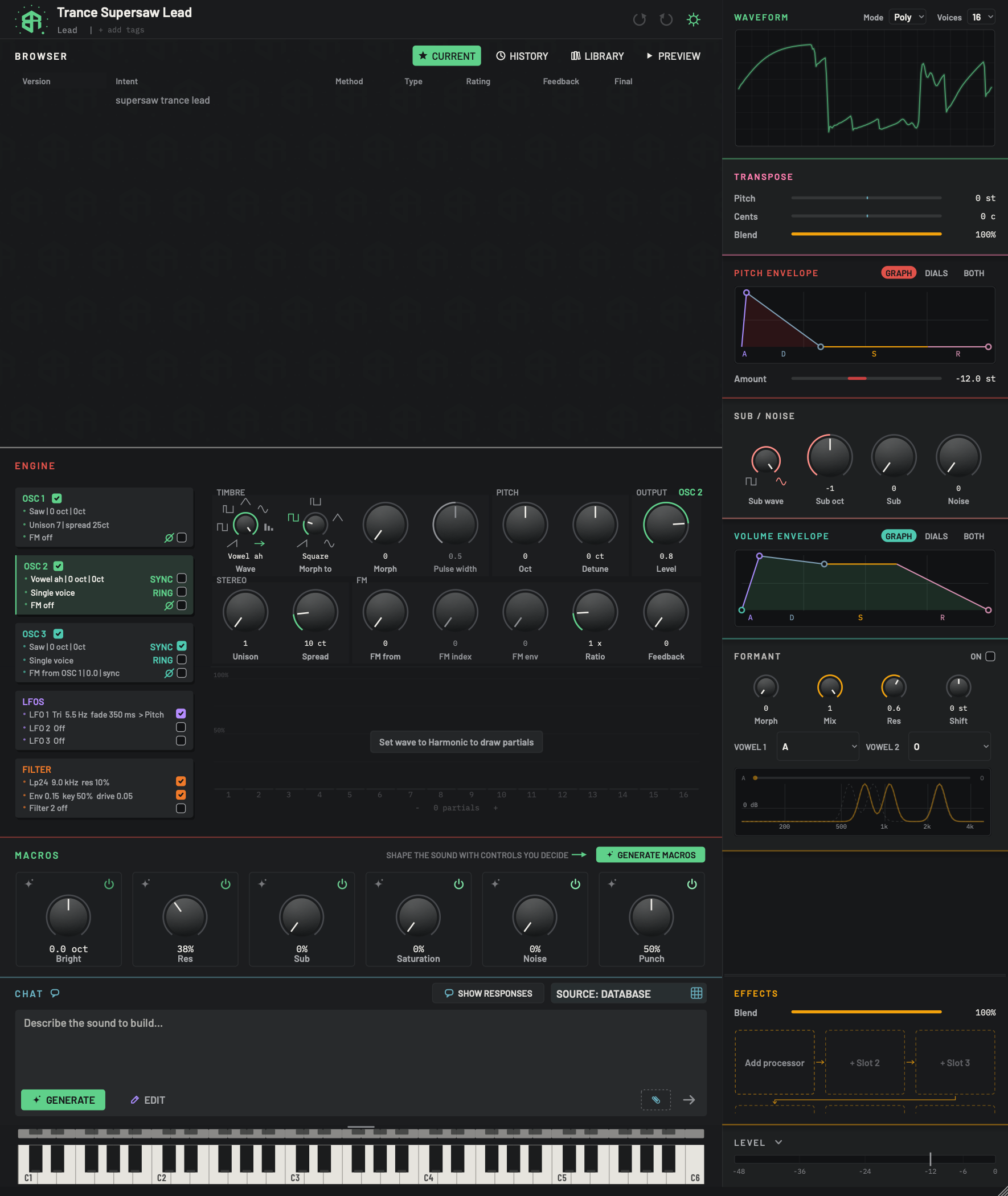
The same dials as OSC 1, now for the second oscillator. Each dial is described in full on Engine: oscillators, OSC 1 open.
-
1OSC 2 cardChoice
The open card is the one with the coloured bar at its left. Its lines read
Vowel ah | 0 oct | 0ct,Single voiceandFM off. The tick beside the name turns OSC 2 on and off, which changes how many oscillators the sound has. The SYNC and RING checks and the phase flip are on the right of the card. -
2Sync, Ring and PhaseSwitch
SYNC and RING are off here, and the phase flip is not set. See Sync and Ring and Phase flip.
-
3Open oscillator nameDisplay
Reads OSC 2, in OSC 2's colour.
-
4Wave (a bank wave)Dial
This oscillator uses a wave from the bank, Vowel ah. The pointer rests on the arrow mark, and the wave's name replaces the label under the dial. Right-click to choose another. See The wave menu.
-
5LevelDial
Set to 0.8 here, so this oscillator sits a little under OSC 1 in the mix. See Level.
-
6Unison and SpreadDial
Unison is 1 and Spread reads 10 ct. With one voice, spread has nothing to spread. See Unison.
-
7FM dialsDial
FM from is OFF, so FM index and FM env rest, greyed. Ratio and Feedback keep their places. See FM from.
-
8Harmonics areaArea
Greyed, because the wave is not Harmonic. See Harmonics area.
Granular sounds
A granular sound plays a sample as a cloud of tiny grains. Its engine keeps OSC 1 and OSC 2, and a GRANULAR card takes the place of OSC 3. The card names the sample file (or No sample yet), the grain length and rate, and the window shape.
The granular card opens a row of dials: Grain (10 to 500 ms, default 80), Density (1 to 100 grains a second, default 20), Scan (0 to 1), Spread (0 to 1), Spray (0 to 12 st), Reverse (0 to 1), Speed (-2 to 2 x), Jitter (0 to 1) and Window (Hann, Triangle, Gate or Decay). A NEW FILE key picks the sample. It reads FIND THE FILE when the file has gone missing. The app copies the sample into your library, so moving the original cannot break the sound.
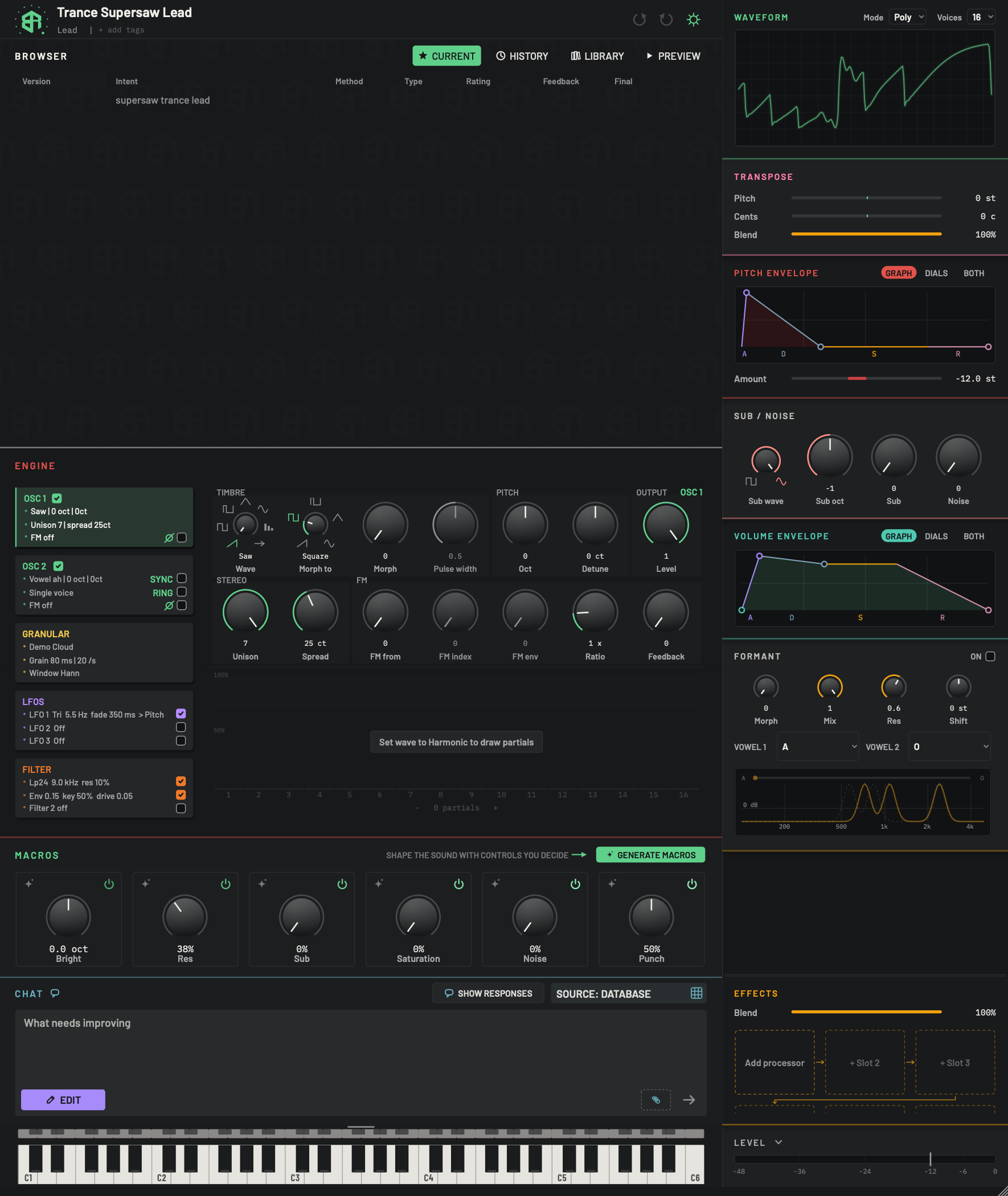
A granular sound plays a sample as a cloud of tiny grains. Its engine keeps OSC 1 and OSC 2 and shows GRANULAR in place of OSC 3.
-
1Granular cardChoice
Opens the grain controls for this sound. The lines on the card read: the name of the sample file (or No sample yet), the grain length and rate, for example
Grain 80 ms | 20 /s, and the window shape, for exampleWindow Hann.There is no tick on this card: a granular sound has no OSC 3.
-
2OSC 1 cardChoice
OSC 1 is still here, open in this picture, with all the dials described on Engine: oscillators, OSC 1 open.
-
3OSC 2 cardChoice
OSC 2 is kept as well. See OSC 2 card.
Try it
-
1Open the oscillator
Click the OSC 1 card. A coloured bar appears at its left edge, and its dials open on the right.
-
2Pick a wave
Right-click Wave and choose a wave from the list, or drag the dial to step through the classics. The name appears under the dial.
-
3Thicken it
Drag Unison up to add detuned copies. You hear the sound thicken.
-
4Widen the stack
Raise Spread to tune the copies further apart. The reading under the dial is in cents.
-
5Balance the level
Turn Level to set how loud this oscillator is. At 0 the oscillator goes silent.
FM needs two oscillators: one that bends and one that is bent. Here OSC 2 bends OSC 1.
-
1Turn on a second oscillator
Tick the check on the OSC 2 card. The sound now has two oscillators.
-
2Open the oscillator to bend
Click the OSC 1 card so its dials are open.
-
3Choose the source
Drag FM from to 2. The FM index dial stops being greyed.
-
4Raise the depth
Drag FM index up. The tone becomes brighter and harsher. The card line now starts with
FM from OSC 2. -
5Set the pitch relation
Turn Ratio to change how the two oscillators relate in pitch. Whole numbers sound tuned and fractions sound bell-like.