
Box Of Synths manualThe synth
Sub, noise and formant
Add a sub bass and noise under the sound, and shape it with vowel sounds using the formant filter.
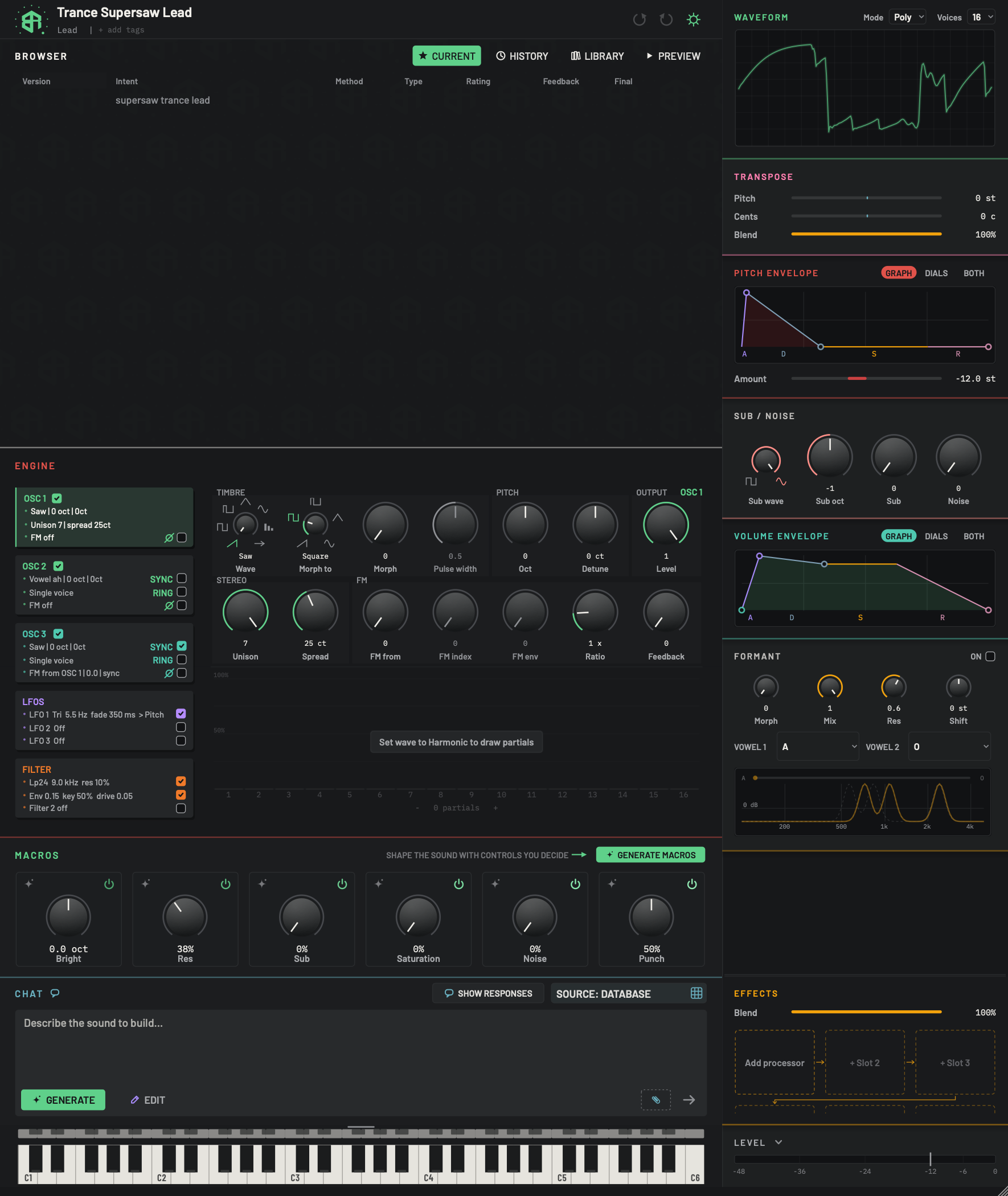
Two blocks in the right-hand column add colour to the sound: Sub / noise adds weight and air, and Formant gives the sound a vowel character.
Sub / noise
The Sub / noise block has four dials. The sub is a simple tone that plays below your sound. The noise is an even hiss.
-
1Sub / noise titleKey
Click the title to fold the block. Folded, only the two words SUB and NOISE show. A word is lit while that part is sounding and dim while it is silent.
-
2Sub waveDial
Chooses the wave of the sub oscillator, a simple tone that sits below your sound to add weight. Drag to step between the choices, or right-click for a list. Choosing OFF turns the sub off. Choosing a wave again after OFF brings the Sub level back to half.
- Options
Off, Square, Sine. A small symbol for each sits under the dial.
- Starts as
- Off, because the Sub level starts at zero
-
3Sub octDial
How many octaves below the played note the sub sounds. Drag up or down to step.
- Options
-2, -1, 0. The value shows above the label.
- Starts as
- -1
-
4SubDial
How loud the sub is. At zero you hear none of it.
- Options
0 to 1.
- Starts as
- 0
-
5NoiseDial
How much white noise is mixed in. White noise is an even hiss, useful for breath, air and attack.
- Options
0 to 1.
- Starts as
- 0
| Dial | Choices or range | Starts at | What it does |
|---|---|---|---|
| Sub wave | Off, Square, Sine | Off | The wave of the sub. Off turns it off. |
| Sub oct | -2, -1, 0 | -1 | How many octaves below the played note the sub plays. |
| Sub | 0 to 1 | 0 | How loud the sub is. |
| Noise | 0 to 1 | 0 | How much white noise is mixed in. |
Turn Sub wave away from Off and the Sub level comes up to half, so you hear it straight away. Right-click the Sub wave dial to pick a wave from a list. Dials move like every dial: drag, double-click to type, Alt-click (Option on a Mac) to reset. See How dials, sliders and keys behave.
Click the Sub / noise title to fold the block. Folded, it shows the words SUB and NOISE, each lit while that part is sounding.
Put a simple tone an octave below your sound, then a little noise on top.
-
1Choose a sub wave
Turn Sub wave from OFF to Sine for a smooth sub, or Square for a harder one. The Sub level comes up to half.
-
2Pick the octave
Drag Sub oct to -1 for one octave below, or -2 for two.
-
3Set the level
Drag Sub up until you feel the weight you want.
-
4Add noise
Drag Noise up a little for breath and air.
Formant
The Formant filter puts the sound through vowel shapes, the way a mouth shapes a voice. You choose two vowels and slide between them.
-
1Formant titleKey
Click the title to fold the block. Folded and switched on, it shows the two vowels and the morph amount, for example A > O 40%. Folded and off, it shows nothing.
-
2Formant onSwitch
Click to switch the formant filter on or off. It stays visible when the block is folded. When it is off, the dials and the graph are dimmed and the sound is untouched.
- Starts as
- Off
This is the same effect as the Formant tile in the effects block.
-
3MorphDial
Slides the sound from Vowel 1 to Vowel 2. At zero you hear only Vowel 1. At full you hear only Vowel 2. Sweeping it makes the sound talk.
- Options
0 to 1.
- Starts as
- 0
-
4MixDial
How much of the vowel sound you hear against the plain sound.
- Options
0 to 1.
- Starts as
- 1
-
5ResDial
How sharp the vowel peaks are. Low values give broad, soft peaks. High values give narrow, sharp peaks.
- Options
0 to 1.
- Starts as
- 0.6
-
6ShiftDial
Moves all the vowel peaks up or down, like a smaller or bigger throat.
- Options
-12 to +12 semitones.
- Starts as
- 0 st
-
7Vowel 1Menu
Click to choose the first vowel, the one you hear when Morph is at zero.
- Options
A, E, I, O, U, then Ä, Ö, Ü, Å, Oo and Uh. The current choice is ticked.
- Starts as
- A
-
8Vowel 2Menu
Click to choose the second vowel, the one you hear when Morph is at full. It has the same list as Vowel 1.
- Options
A, E, I, O, U, then Ä, Ö, Ü, Å, Oo and Uh. The current choice is ticked.
- Starts as
- O
-
9Response graphDisplay
A chart of the vowels, from 100 Hz to 5 kHz, with marks at 200, 500, 1k, 2k and 4k. Each vowel is drawn as a dashed curve with three peaks. The amber curve is the sound you are getting now, between the two. A bar across the top carries the two vowel names at its ends and an amber dot where Morph sits. Everything dims when Formant is off. The chart only shows: the dials do the moving.
Switch it on
Click the box beside ON in the title. It stays visible when the block is folded. Folded and on, the block shows the two vowels and the morph, for example A > O 40%. Folded and off, it shows nothing. Formant starts off. It is the same effect as the Formant tile in the effects block.
The dials
| Dial | Range | Starts at | What it does |
|---|---|---|---|
| Morph | 0 to 1 | 0 | Slides from Vowel 1 to Vowel 2. |
| Mix | 0 to 1 | 1 | How much vowel sound you hear against the plain sound. |
| Res | 0 to 1 | 0.6 | How sharp the vowel peaks are. |
| Shift | -12 to +12 semitones | 0 | Moves the peaks up or down, like a smaller or bigger throat. |
The vowel menus
Vowel 1 and Vowel 2 each open a menu with the same eleven vowels, with the current one ticked.
| Menu entry | Note |
|---|---|
| A, E, I, O, U | The five basic vowels. |
| Ä | As in "bad". |
| Ö, Ü | The rounded vowels of German and Swedish. |
| Å | The "aw" sound of "law". |
| Oo | As in "book". |
| Uh | The soft, neutral "uh" sound. |
Vowel 1 starts as A and Vowel 2 as O. On the folded title the vowels Ä, Ö, Ü and Å read AE, OE, UE and AA.
The response graph
The chart under the menus shows the vowels from 100 Hz to 5 kHz, with marks at 200, 500, 1k, 2k and 4k. Each vowel is a dashed curve with three peaks. The amber curve is the sound you are getting now. A bar across the top carries the two vowel names and an amber dot at the Morph position. The graph only shows: the dials do the moving. It dims when Formant is off.
Switch the formant filter on and morph between two vowels.
-
1Switch it on
Click the box beside ON in the Formant title. The graph brightens.
-
2Pick the first vowel
Click Vowel 1 and choose a vowel from the list, for example A.
-
3Pick the second vowel
Click Vowel 2 and choose another, for example O.
-
4Morph between them
Hold a note and drag Morph slowly. The sound slides from one vowel to the other, and the amber curve in the graph follows.
-
5Adjust the voice
Turn Shift to move the vowels up or down, and Res to make the peaks sharper.