Box Of Synths manualDesigning sounds
Sources, tokens and what a design costs
Who can design your sounds, what each source costs, how tokens work and what happens when they run out.
A source is whoever designs your sound when you press Generate or Edit. Box Of Synths has four, and each costs something different. Two of them are free. This page explains each one in plain terms so you are never surprised by a cost.
You choose a source in two places. The Source control in the chat changes it on the spot: see The chat and the composer. The Designer tab of Settings sets it up in full: see Settings: Designer and Settings: Designer, source by source.
The four sources side by side
| Source | What it costs | What it needs | Works with no internet | Takes context |
|---|---|---|---|---|
| Built-in database, offline | Free, with no limit | Nothing | Yes | No |
| Built-in database, online | Free, with a daily and monthly allowance | A sign-in | No | No |
| Tokens (Box Of Synths) | Tokens from your account | A Box Of Synths account and a connection | No | Yes |
| My own AI key: Claude, OpenAI, OpenRouter or a custom endpoint | Whatever your provider charges you | An account with the service, and its key (a custom endpoint may not need one) | No | Yes |
| Local model: Ollama or LM Studio | Free | The app running on your computer, with a model installed | Yes | Yes |
In every case, the sound you design is yours to keep, and it lands in the Browser as a version.
Built-in database
The built-in database designs from a large collection of sounds. It is instant and it is free. It has two connections, which you choose in Settings on the Designer tab.
- Offline uses the packs on this computer. It is free, instant, has no limit, and works with no internet. Download free packs in Settings adds more.
- Online uses the whole database on our site, always current, including packs you have bought. It allows 30 designs a day and 100 a month, and it is unlimited on a plan. You must be signed in.
If you have used up the online allowance, or if the site does not answer, the packs on your computer answer instead. You still get a sound, and nothing is charged.
The database reads descriptions of sounds, such as a warm pad or a reese bass. It does not write beats or melodies. If you ask for one, it says so and leaves your sound alone. See The chat and the composer.
Tokens
Tokens are our hosted designer's currency. You buy them on our site. Using them gives you the designer with the whole database behind it, and it lets you attach context to a request.
What a token buys
The tokens card puts it in one line: Each action you type costs 1 token: a new sound or an edit, plus 1 for each piece of context you add. Everything below follows from that.
| Action | Cost |
|---|---|
| A new sound with Generate | 1 token |
| A change with Edit | 1 token |
| Each piece of context | 1 more token each |
| A drawn wave with no words | Free |
| A granular sound with no words | Free |
| Randomise by word | Free |
| Undo, redo, loading a version, playing | Free |
When the source is Tokens, the cost is shown on the Generate and Edit keys as a gold coin and a number. The number updates as you attach context.
A new sound on tokens may come back as several takes to choose from. One token covers all of them. See Takes. On your own key, takes are off until you turn them on, and then each new sound sends three requests that your service bills.
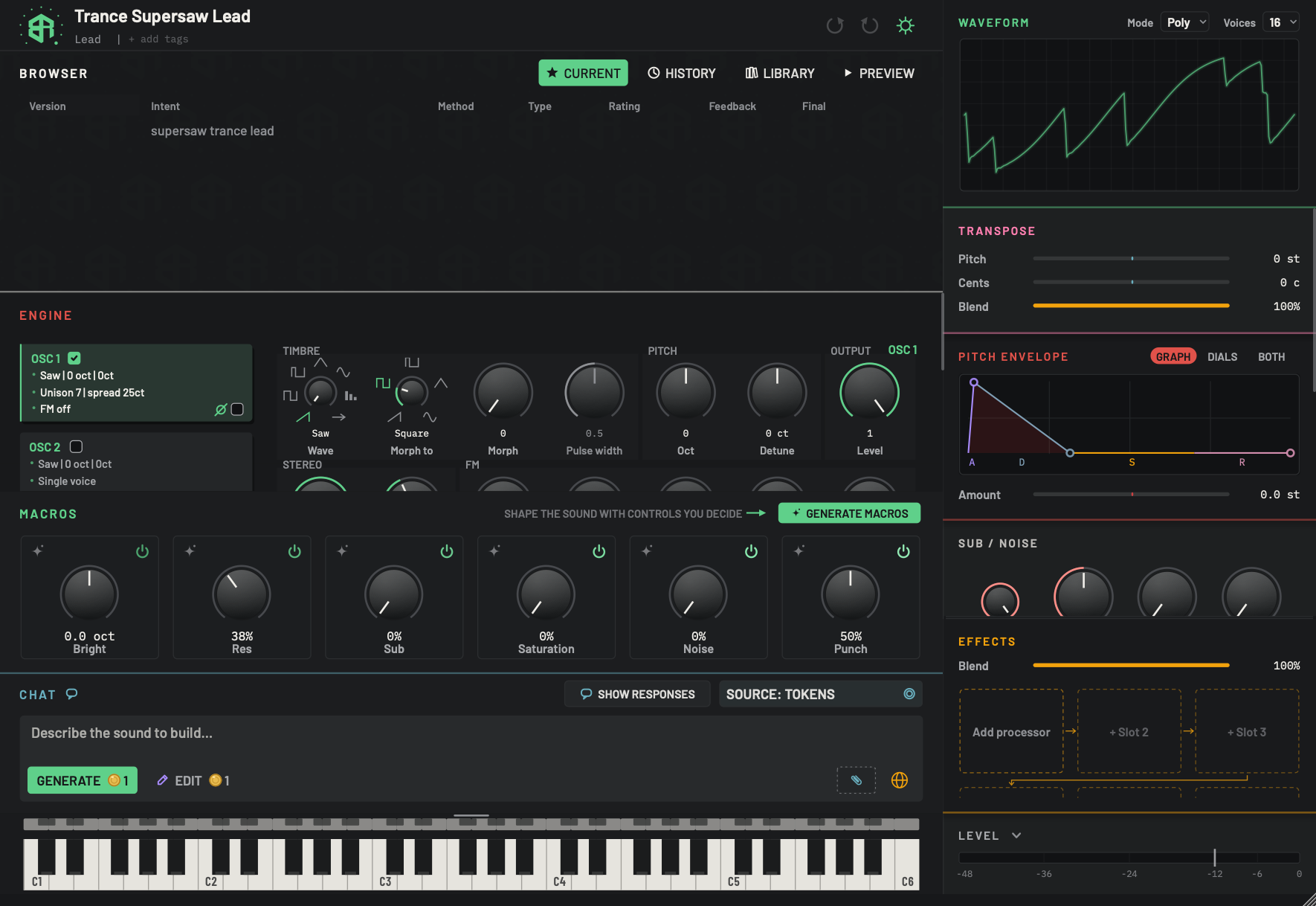
When the source is Tokens, each action costs tokens, and the keys show the cost before you press them. See Sources, tokens and what a design costs.
-
1Request with no versionTable
A request that produced no sound has a row of its own in the Browser. It shows your words, dimmed, with no version, stars, thumbs or play key. It cannot be loaded. See Browser: Current.
-
2Show responsesSwitch
Unchanged. See The chat and the composer.
-
3Source: TokensMenu
Reads SOURCE: TOKENS, with a coin glyph at the right. Your requests go to our hosted designer and use tokens from your Box Of Synths account. Click it to pick another source.
The first time you use Tokens, a card called DESIGNING ON TOKENS asks you to agree. See Sources, tokens and what a design costs and Agreements and confirmations.
-
4Description boxText box
Works as it does with any source. See The chat and the composer.
-
5Generate with its costKey
A gold coin and a number sit on the key. The number is what a new sound will cost in tokens: 1, plus 1 for each piece of context attached.
- Options
1 token, plus 1 for each piece of context.
With any other source there is no coin.
-
6Edit with its costKey
The same coin and number on Edit. An edit costs the same as a new sound: 1 token, plus 1 for each piece of context.
- Options
1 token, plus 1 for each piece of context.
-
7Paperclip (context)Menu
Each piece of context you attach adds 1 to the cost shown on Generate and Edit, and the key shows how many you have attached. See The chat and the composer.
-
8Send arrow showing a globeKey
The arrow turns into a globe when the app cannot reach the token service. Click it to check the connection again. Nothing is sent and no token is used.
Hovering shows Cannot connect to the token service. Click to check again; nothing is submitted. The arrow returns once the service answers.
Agreeing before your first design
The first time you design on tokens, a card called DESIGNING ON TOKENS appears before the request is sent. It states the cost and what happens when you run out.
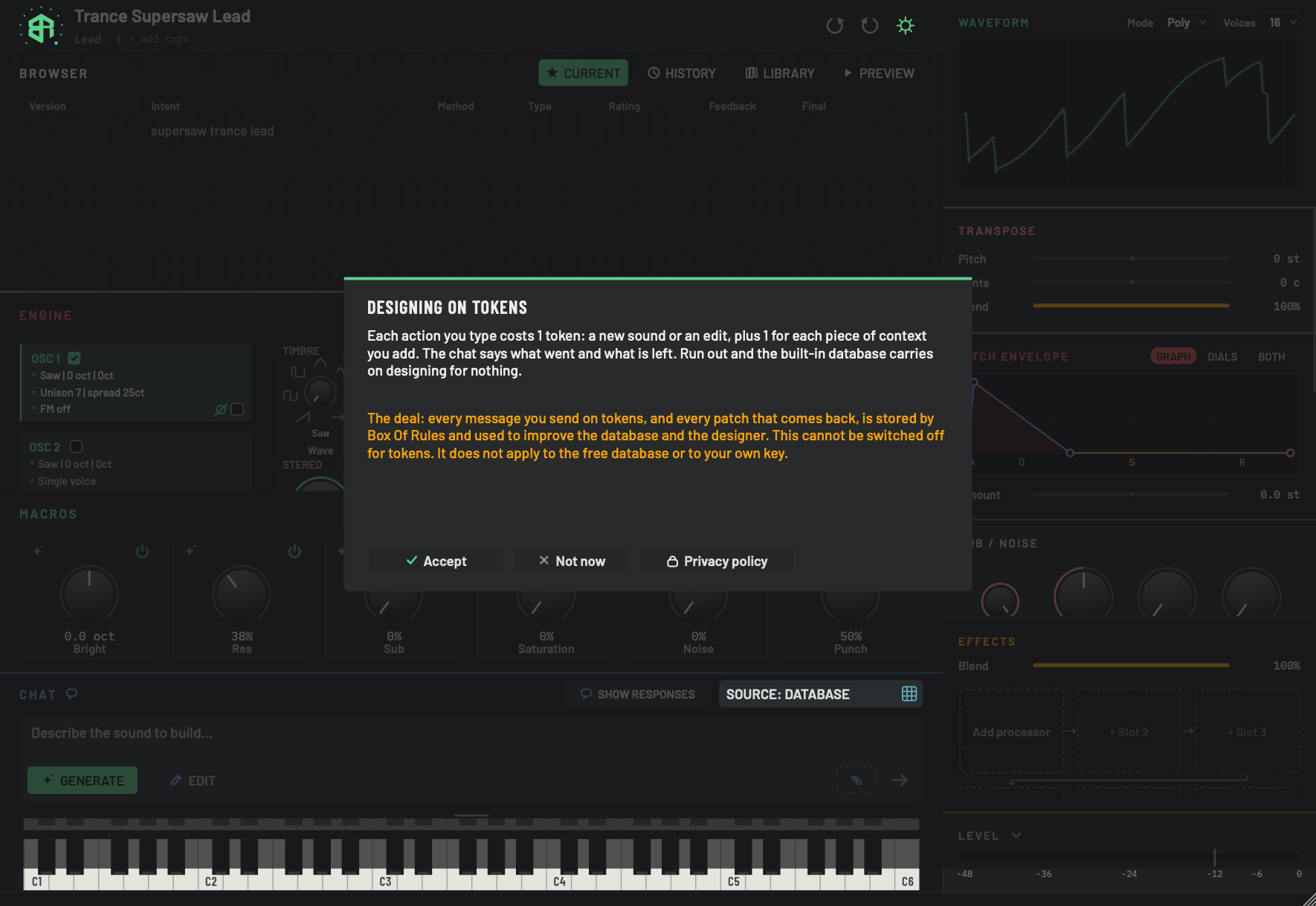
This card appears before your first design on tokens. The whole card is described on Agreements and confirmations. Here are the two parts that matter for cost.
-
1What a token buysDisplay
States the price in tokens and what happens if you run out. It reads Each action you type costs 1 token: a new sound or an edit, plus 1 for each piece of context you add. The chat says what went and what is left. Run out and the built-in database carries on designing for nothing.
The card has a second paragraph, in amber, about how requests sent on tokens are kept and used. Read it before you accept.
-
2Accept, Not now, Privacy policyChoice
Accept agrees and sends your request. Not now closes the card and the request is not sent on tokens. Privacy policy opens our privacy page in your browser. Clicking outside the card does nothing.
The card appears again only if the agreement changes.
The card also explains how requests made on tokens are kept and used, and it does not apply to the free database or to your own key. Read it before you accept. The whole card is on Agreements and confirmations.
Accept sends your request. Not now closes the card without sending it, and the database and your own key still work.
Signing in
Tokens need a Box Of Synths account, and only tokens need one. When you pick Tokens with no account, a sign-in page opens in your browser. Sign in there and return to the app. You can also sign in under Settings, on the Account tab. See Settings: Account and privacy.
If you press Generate on tokens without being signed in, the sheet can say Sign in to design on your tokens. Your patch has not changed.
Where to see your balance
Your balance is on the Account tab of Settings, on the line Tokens balance. It updates after every design. The Browser table also has a Tokens column showing what each version cost. It is hidden at first. Right-click the table's header row and tick Tokens to show it.
Topping up and running out
When you run out, a design sent on tokens is not made. The design sheet reads No tokens left. with BACK, and a gold TOP UP key appears beside the description box. Hover it for Out of tokens. Top up on boxofsynths.com; the database still designs for nothing. Click it to open the tokens page of our site in your browser.
Topping up is also on the Account tab, under Top up tokens.
You can also earn a free token. When a loyalty card is running for your account, choosing a take of a new sound on tokens can earn a stamp, and a full card is a free token. See Takes and Settings: Account and privacy.
You are never stuck. Choose Database from the Source control and keep designing for nothing. The tokens card says the same: Run out and the built-in database carries on designing for nothing.
When tokens do not work
These messages appear on the design sheet, with BACK, and your words return to the box.
| Message | What it means |
|---|---|
| Cannot connect to the token service. Nothing was charged. | The app could not reach the service. Check your connection and try again. |
| Box of Synths is unavailable. Your patch has not changed. | Our service is switched off for now. The database still works. |
| The site did not answer in time. Send the same words again: a sound that was already made comes back without a second token. | Send the same words again. You will not pay twice for a sound that was already made. |
| The connection ended before the result was confirmed. Check your account before retrying. | The reply was cut off. Check your balance first. |
If you send exactly the same words again soon after, a card called THE SAME WORDS AGAIN asks whether you want to spend tokens again. Spend again sends it. Cancel keeps your tokens.
If our site is down, a red band under the header says so, and it adds that the database still designs. See The screen at a glance.
Change who designs your sounds from the chat, and see what the first design on tokens looks like.
-
1Open the Source menu
Click Source at the top right of the chat. A short menu opens with a tick on the source in use.
-
2Pick Tokens
Click Tokens. The control now reads SOURCE: TOKENS. If you have no account yet, a sign-in page opens in your browser. Sign in there, then return to the app.
-
3Read the cost
A gold coin and a number now sit on Generate and Edit. That number is what the next request will cost.
-
4Send your first request
Type a description and press
Return. The first time, a card called DESIGNING ON TOKENS appears first. Read the cost in the first paragraph. -
5Accept or step back
Click Accept to send the request. Click Not now to close the card without sending. You can pick Database from the Source menu at any time to design for nothing.
Your own AI key
If you already pay for an AI service, you can use it to design your sounds. The Designer tab offers Claude, OpenAI and OpenRouter, and a custom endpoint for any other service that speaks the same way. The service bills you directly. We do not charge tokens, and we cannot see or cap what it charges.
The first time you choose one, a card called Your keys, your bill opens. It begins Designs on your own AI key are billed by your provider, to you. Press I understand, use my key to go on, or Not now to leave your source as it was. See Agreements and confirmations.
You set up the service and its key under Settings, on the Designer tab. See Settings: Designer, source by source.
- A new sound may arrive twice. With your own key, a new sound first arrives from the built-in database straight away, while your service is still working. The sheet reads Database version ready. Your AI is still designing. Your service's version follows.
- Context is allowed. We add no charge for it. Your provider bills what it bills.
- The online database helps for free. A switch in Settings, Online database for my own AI (free), is on by default. It lets the site's database inform the request before it goes to your service. It uses no tokens.
Keeping an eye on your spend
After your first request on your own key, a small robot key appears in the header, to the left of undo. Click it to see an estimate: Today, This month and All time, with the number of requests and the amount sent and received. The estimate comes from each service's list price, and your provider's bill is the real figure. The menu also opens the usage log and the folder of failed requests, and can clear the counters. If a request fails, the app saves the exchange in a folder for you to look at. Nothing in it includes your key.
Local model
A local model runs on your own computer, so it is free and needs no key. The Designer tab offers two apps, Ollama and LM Studio. You set one up in Settings, on the Designer tab, and the app must be running. It works with no internet. A local model can take a while to answer, and longer the first time while it loads. See Settings: Designer, source by source.
Agent
An agent is a helper program connected to Box Of Synths on your computer. In this release it is not a source for the sounds you type: the Agent key in Settings sends the source back to the database, and Agent is not in the chat's Source menu. An agent can still send requests and control changes through the Inbox and Outbox folders in your library. One that asks for a design while you are away is, by default, answered from the database, so it cannot spend your tokens or your own key. You can allow it to under Let agents spend tokens or my AI key on the Advanced tab. See Settings: Advanced.
Which source should I use?
- To start, use Database. It is free and quick, and it is the right place to learn.
- For a sound described in your own words, with the whole database behind it and the ability to attach context, use Tokens.
- If you already pay for an AI service and want to use it, use Your own AI key.
- If you want no cost and no internet, use Database offline or a Local model.